
Where do you track brand deals, and who still owes you?
The deal is in your DMs and the invoice is in Google Docs. A brand agrees to a fee in an email thread, and you copy last month’s invoice, change the name and send it, hoping the bank details are still right. Then net 30 turns into net 60, the agency pays only when the brand pays them, and the invoice that goes overdue is the one for a deal you never wrote down.
A spreadsheet helps until you forget to update it. Invoicing apps don’t know what a deliverable or a sponsor is, and neither sits next to your channel’s analytics.
One of Theo’s sponsors, six weeks past due
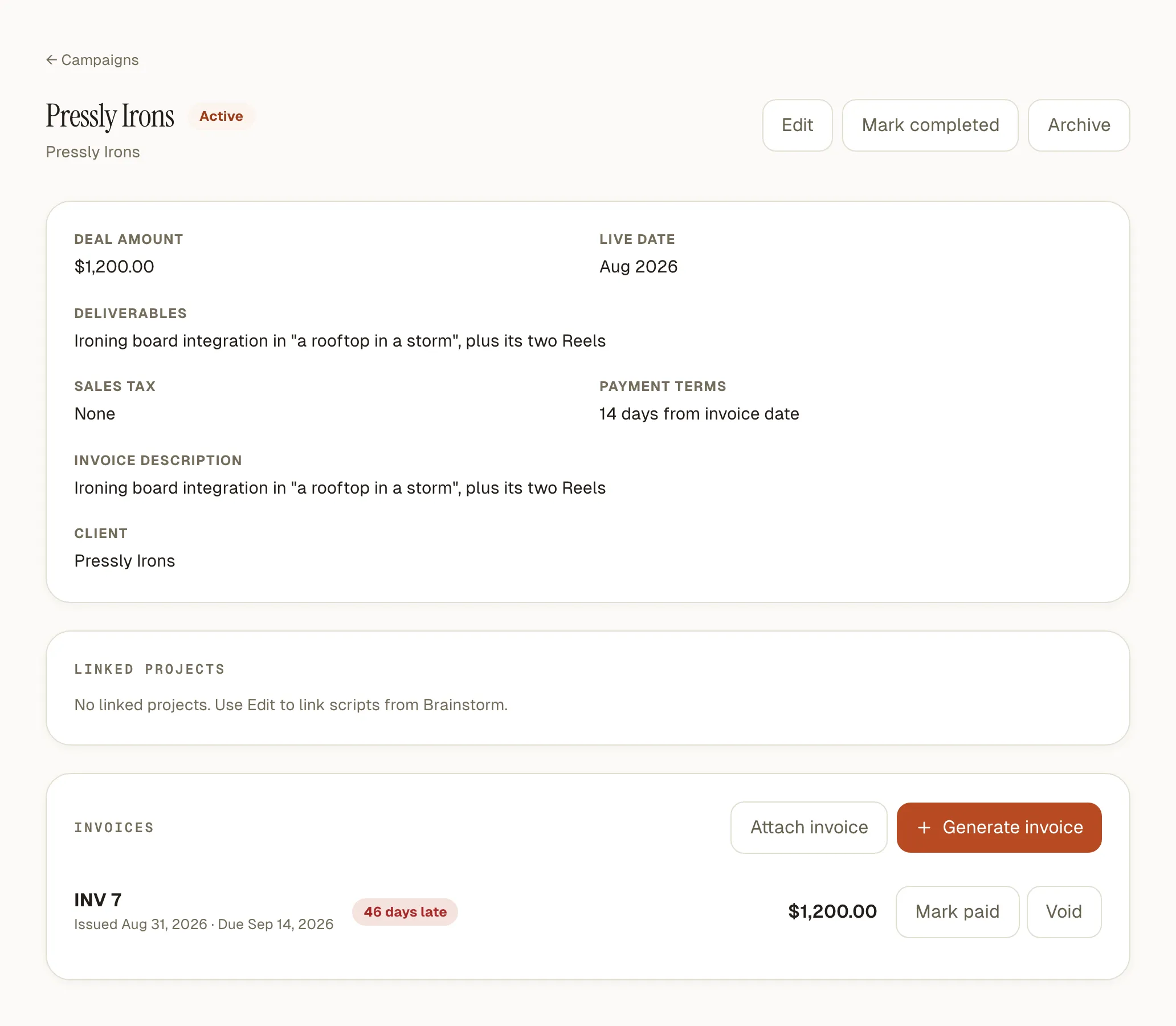
Theo, Creable’s demo creator, did an integration for Pressly Irons. Here is the deal as he logged it, and what the studio showed on 30 October, word for word.
- The deal
- “Ironing board integration in "a rooftop in a storm", plus its two Reels”, $1,200.00, live in August, payment terms “14 days from invoice date”, no sales tax.
- Its invoice
- “INV 7 · Issued Aug 31, 2026 · Due Sep 14, 2026 · 46 days late”, with Mark paid and Void beside it.
- The top of his Campaigns page
- Outstanding $2,000.00. Overdue $1,200.00, “1 invoice · up to 46 days late”. Due this week $800.00, his Morrow Coffee invoice.
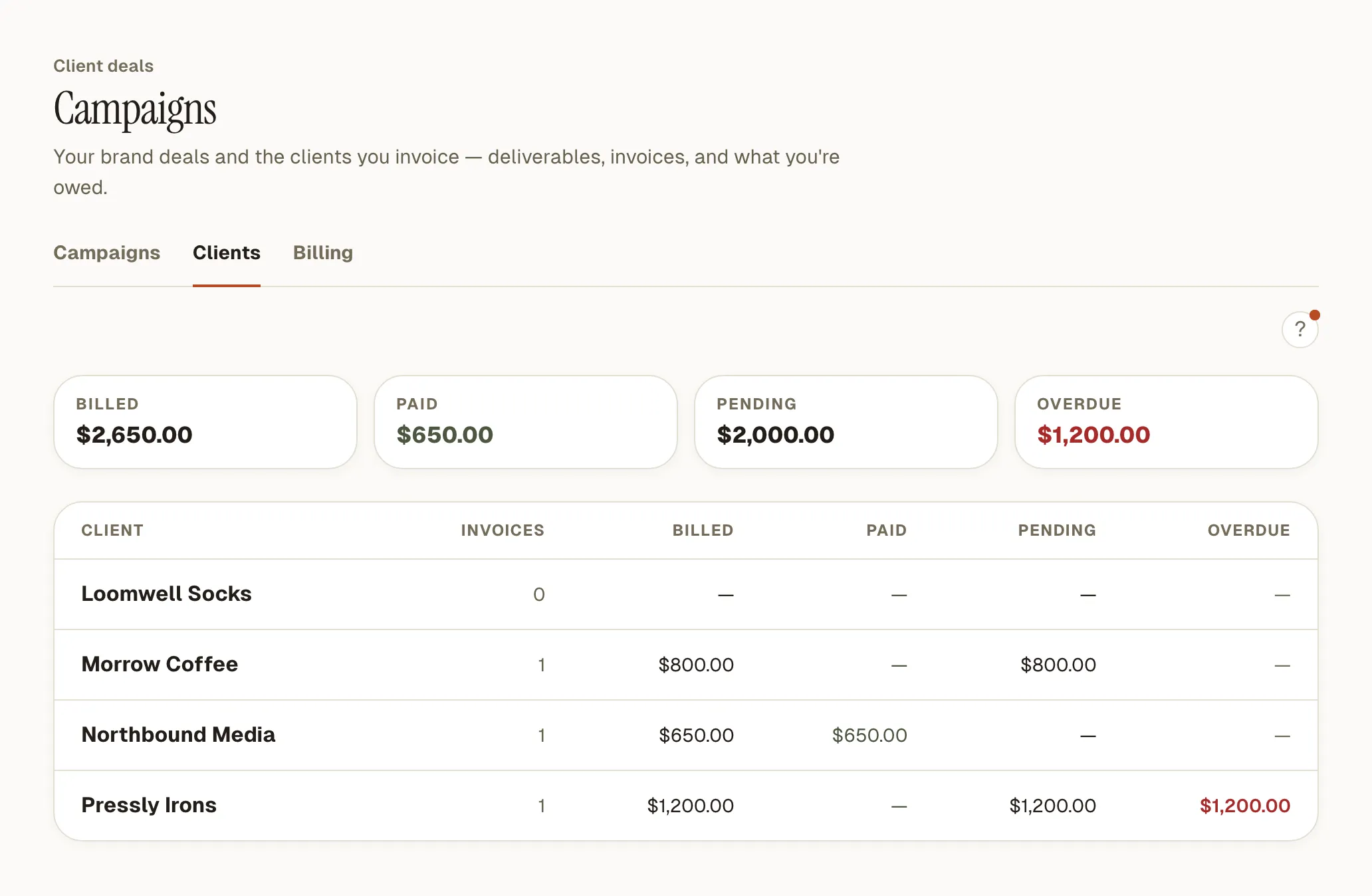
- Per client
- Four clients: billed $2,650.00, paid $650.00, pending $2,000.00. The paid invoice went to Northbound Media, the agency behind his Kestrel Packs deal.
Theo is Creable’s demo channel: a full test account, reseeded every week.
How it works
-
Add your details once
Open Billing and add the name and address invoices come from, a bank account for each currency you’re paid in, and your signature. Upload a photo of your signature and Creable removes the background. In India or Australia, add your PAN and GSTIN or your ABN too.
-
Log the deal
The client you bill, the brand being promoted, the agency if there is one, what you’re delivering, the fee, the live date and the payment terms, counted from the invoice date or the live date.
-
Generate the invoice and send it
Creable fills in the PDF from the deal. You download it and send it the way the brand asked. When the money lands, mark it paid.
A sponsorship tracker for YouTube, Instagram and TikTok creators
Every brand deal in one list
Studio plan · preview in the trial
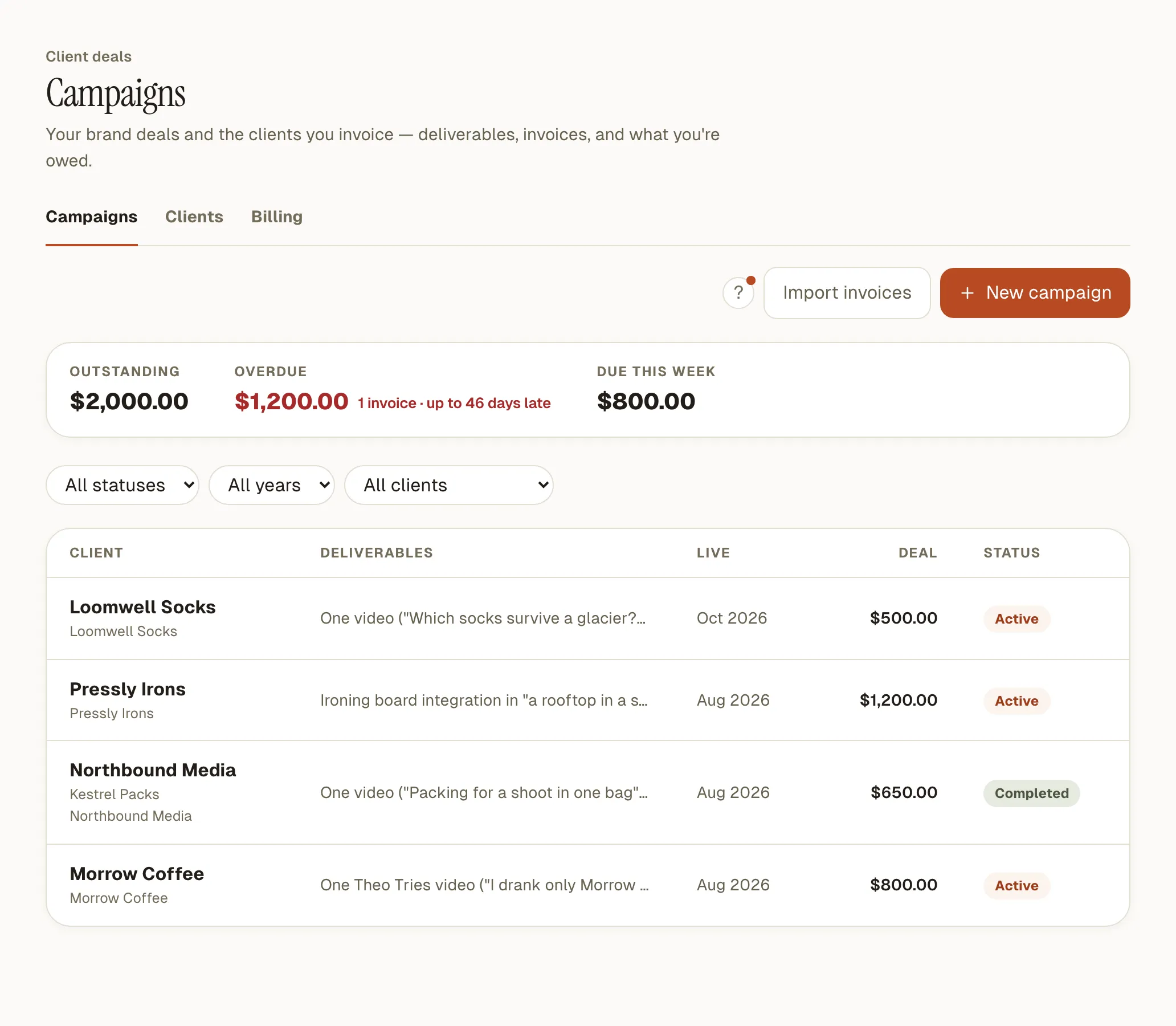
Each deal shows the client, the brand, the deliverables, the live date, the fee and whether it’s active, completed or archived. Filter by client, year or status. A deal made through an agency shows the brand and the agency.
An invoice from the deal
Studio plan · preview in the trial
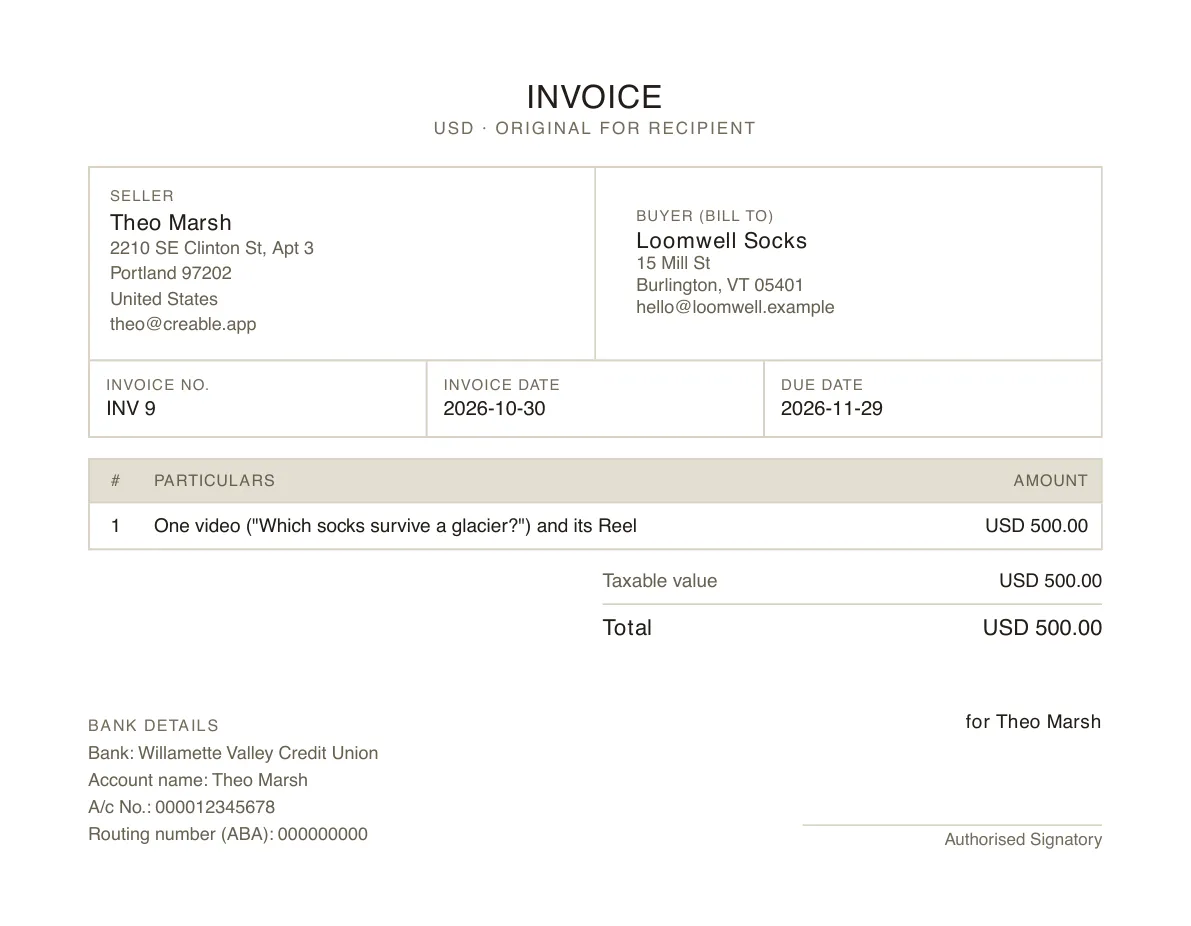
Creable fills in your details and the client’s, an invoice number, the issue date and a due date worked out from your terms. The deal’s invoice description, or its deliverables, becomes the line item, which you can edit before generating. Then the tax for the client’s country, the bank account that matches the invoice’s currency, and your signature. It downloads as a PDF.
What you’re owed, at a glance
Studio plan · preview in the trial
The top of the page shows what’s outstanding, what’s overdue and what falls due this week. Each late invoice says how many days late it is. The Clients tab shows billed, paid, pending and overdue for each client. Every amount stays in its own currency and is never converted. All of it sits in the same studio as your cross-platform analytics.
A reminder before you’d notice
Studio plan · preview in the trial
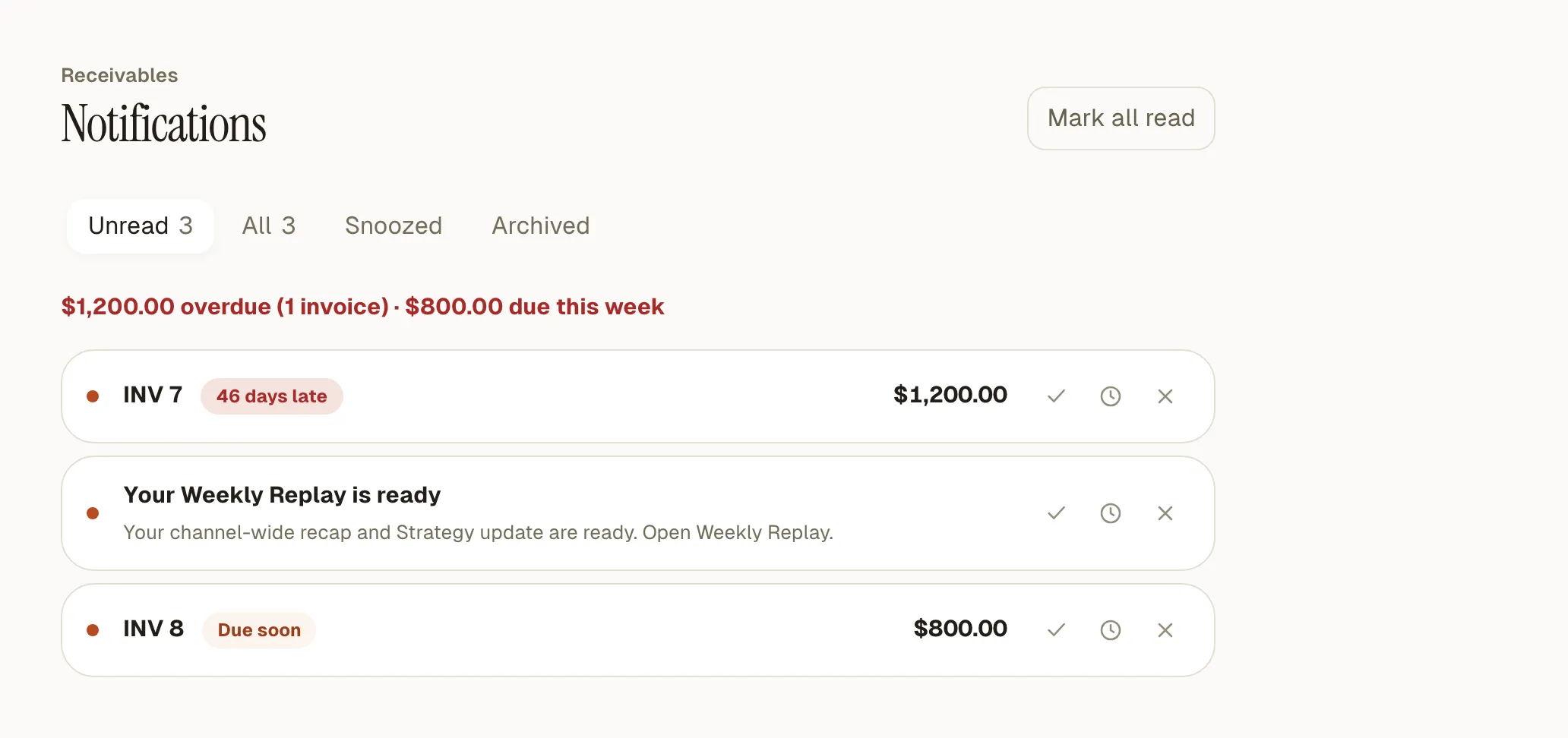
Three days before an invoice is due, on the due date, then once a week while it’s late, Creable emails you around 9 a.m. in your time zone. Every invoice due within a week or overdue also sits in the studio’s notifications until you mark it paid or void it. The reminders go to you, never to the brand.
Your past invoices, without retyping them
Studio plan · preview in the trial
Drop in invoice PDFs you’ve already sent, several at once, up to 10 MB each. Creable reads the client, the amounts, the dates and the tax, matches them to an existing client and deal where it can, and shows every field for you to check before anything is saved. Invoices you’ve already imported are skipped.
How to invoice a brand as a creator
A brand’s finance team pays an invoice faster when nothing is missing. It needs your legal name and address, your tax registration where you have one, and the name and address of whoever you’re billing, which is the agency if an agency booked you. Then an invoice number, the date, a due date, what you delivered, the amount, the tax line and where to send the money.
Instead of an invoice template, Creable fills each of those in from Billing and the deal. The tax line follows the client’s country: sales tax for the US, VAT for the UK, GST for Australia, GST split into CGST and SGST or IGST for India, and a plain tax line elsewhere. Each bank account is labeled for the country the bank is in: a routing number in the US, a sort code in the UK, a BSB in Australia, an IFSC in India. SWIFT/BIC prints where you add it, and so does an IBAN for UK and other accounts.
Your own tax ID prints only for India (PAN and GSTIN) and Australia (ABN) so far. A US EIN or UK VAT number has no field yet.
If a brand asks for a purchase order number, add it to the line item or the invoice’s remarks. There’s no separate PO field yet.
Why not a spreadsheet, a Notion template or an invoicing app?
A template is free and does the job if you have only a few deals a year. Invoicing apps such as Bonsai, Wave and FreshBooks send the invoice, chase the client and take card payments, none of which Creable does.
Creable is for the creator with deals most months who wants the deal, the invoice and the balance in one place, next to the channel the deals come from.
| Spreadsheet or Notion template | Invoicing app (Bonsai, Wave, FreshBooks) | Creable | |
|---|---|---|---|
| Tracks deals and deliverables | Yes, by hand | As projects or clients | Yes |
| Makes the invoice | In a separate doc | Yes | Yes, from the deal |
| Sends the invoice and chases the client | No | Yes | No: you send it |
| Takes card or online payment | No | Yes | No |
| Reminds you about late payments | No | Reminds the client | Reminds you |
| Reads your past invoice PDFs in | No | Varies by app | Yes |
| Next to your channel’s analytics | No | No | Yes |
Other tools as of October 2026.
What it doesn’t do
- It doesn’t send invoices or contact brands
- You download the PDF and send it yourself, from your own email, so the brand hears from you and not from a tool.
- No payments or payment links
- The invoice carries your bank details, and the brand pays your account directly. Creable never touches the money.
- A deal doesn’t show the posts it paid for
- Creable doesn’t report a sponsored post’s results to the brand, or show them on the deal yet.
- No pipeline of pitches
- A deal starts once it’s agreed. There are no stages for pitched or negotiating.
- Deliverables are a single text field
- Not a checklist with a date per item. Contracts and briefs aren’t stored, only the invoice PDF.
- No partial payments or edits after issuing
- An invoice is paid in full or not. To change an issued invoice, void it and generate a new one.
- Seven currencies, English invoices
- USD, EUR, GBP, AUD, INR, AED and SGD. Invoices are written in English.
- No export, accounting sync or team seats
- There’s no CSV export or QuickBooks or Xero connection, and one account is one login. Each invoice’s PDF downloads on its own.
Questions
What’s the best way to track brand deals as a creator?
With only a few deals a year, a spreadsheet or a free Notion template is enough, as long as you update it. With deals most months, the risk is the invoice nobody chased, so you want due dates and reminders. Invoicing apps do that but think in projects, not sponsors. Creable keeps the deal, its invoice and what you’re owed together, and reminds you before a payment is late. It’s on the Studio plan at $99 a month.
Does Creable send the invoice to the brand?
No. Creable makes the PDF and you send it, usually by replying in the thread where the deal was agreed, or by uploading it to the brand’s supplier portal. That keeps the brand dealing with you, not with a tool they’ve never heard of. Creable doesn’t email brands or agencies at any point, including about late payments: the reminders come to you, so you decide when and how to follow up.
Can I invoice the agency instead of the brand?
Yes. Each deal has a client, which is who you bill and who appears on the invoice, and a promoted brand, which is who the content is for. When an agency booked you, make the agency the client and name the brand on the deal. Your Clients tab then shows what each agency owes you across all the brands they’ve sent your way.
Which taxes and countries does the invoice handle?
The tax line follows the country of the client you’re billing. US invoices show sales tax at the rate you enter. UK invoices show VAT, Australian ones GST with “Tax invoice” as the title, and Indian ones GST as IGST or CGST plus SGST, with HSN/SAC codes and the amount in words. Anywhere else gets a plain tax line. You can always set a deal to no tax.
How do the overdue reminders work?
For every issued invoice, Creable emails you three days before it’s due, on the due date, and then once a week until you mark it paid or void it. Emails go out around 9 a.m. in the time zone set in your profile, and every invoice due within a week or overdue also shows in the studio’s notifications. Nothing is sent to the brand. A paid invoice stops its reminders straight away.
Can I import invoices I already sent?
Yes, as PDFs of up to 10 MB each, several at once. Creable reads the client, invoice number, dates, amounts and tax from each one, using GLM, an open-weights AI model hosted by Baseten, with Anthropic’s Claude on Amazon Bedrock as the fallback. It then matches the client and deal where it can, and shows every field for you to correct before anything is saved. An invoice you’ve already imported is skipped.
Which plan includes it?
Brand deals and invoices are on the Studio plan, at $99 a month. The 14-day trial includes them in full, with no card needed, so you can log your current deals and generate a real invoice before deciding. The Studio plan also imports 12 months of history instead of 90 days and drafts replies to comments. The Creator plan at $79 a month doesn’t include brand deals.
Last updated October 30, 2026